
Registration of Business Premises Requirements
Registration of Business Premises
The Registration of Business Premises is an official requirement for all businesses operating within Edo State. This process ensures legal compliance, proper documentation, and alignment with state regulations through the Ministry of Business, Trade, and Cooperatives (MBTC). to fulfill state regulatory obligations. This ensures that all businesses operating within the state are properly documented, compliant, and recognized by the government. [SEE LEVIES RATES FOR PAYMENTS]
Requirements for Business Premises Registration
To complete your registration, kindly provide the following:
1. Business Name
The official registered name of your business.
2. Business Address
The full physical address where the business operations are carried out.
3. Functioning Phone Number
An active phone number for verification and communication.
4. Registration Fee
The applicable registration fee payable to the Edo State Government IGR.
5. Annual Renewal
All registered businesses must renew their Business Premises Permit annually at 50% of the original registration fee. SEE LEVIES RATES FOR PAYMENTS
Processing & ApProcess of Approval
Approval for Business Premises Registration can be completed through two channels:
1. Physical Submission (Walk-In)
Applicants may visit the Ministry of Business, Trade, and Cooperatives (MBTC) in person to:
- Submit all required documents
- Complete registration forms
- Receive assessment and payment instructions
- Obtain government-automated receipts after payment
Processing time is typically one (1) working day upon submission of complete documentation.
2. Online Submission (Email Registration)
Businesses can also complete their registration online by sending all required documents to:
📧 Email: edostatembtc@gmail.com Call: +234-9150783936, +234-8062547913
Steps:
- Submit all required documents via the email above.
- Upon receiving your complete documents, an Assessment Bill will be generated through the Edo Revenue Administration System (ERAS).
- The ERAS-generated assessment will include:
- Bill Reference Number
- Taxpayer RIN (Revenue Identification Number)
- Bill Amount
- Amount Due
- Due Date
- You will make your payment online through the official ERAS platform:
🔗 eras.eirs.gov.ng - Once payment is confirmed, a Government Stamped Receipt will be issued as proof of successful registration.
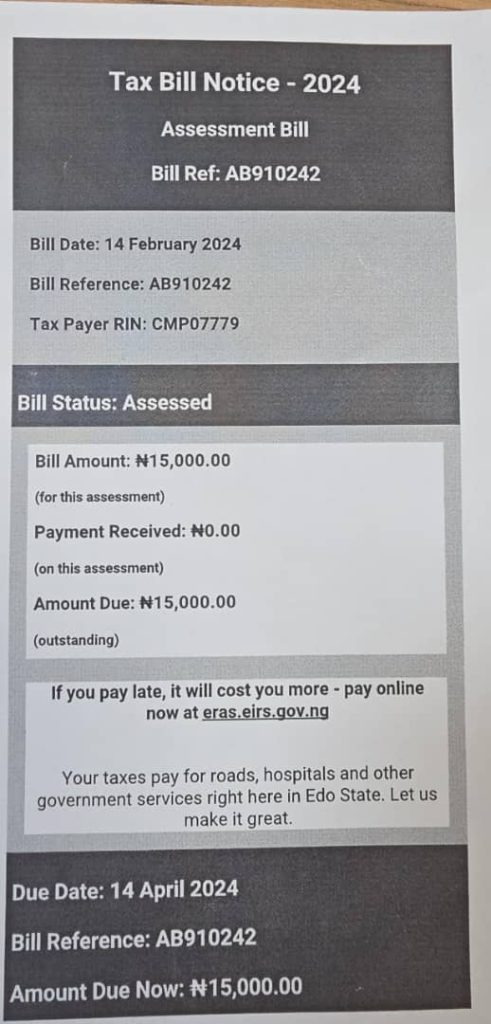
Sample Assessment Bill (ERAS)
Your official ERAS assessment will include information similar to the following:
- Bill Date
- Bill Reference (e.g., AB910242)
- Taxpayer RIN (e.g., CMP07779)
- Bill Status (Assessed / Paid / Outstanding)
- Bill Amount
- Payment Received
- Amount Due
- Due Date
- Payment advisory and government service information
This ensures transparency and compliance in all Business Premises registration.
Below is a SAMPLE of the Assessment Bill generated from ERAS Application.